How to Build a Continuous User Feedback Loop for Your SaaS Product
Yuvin Kim
2026. 6. 15.
How to Build a Continuous User Feedback Loop for Your SaaS Product
Yuvin Kim
2026. 6. 15.
Moving Beyond Quarterly Surveys to In-App, Event-Driven Sentiment Capture with Walla
1. The Death of the Batch Survey
The modern B2B and B2C SaaS landscapes are defined by extreme feature saturation and historically low customer switching costs. When a user encounters a broken workflow, a confusing user interface, or recurring system friction, they rarely take the time to submit a detailed IT support ticket. Instead, they quietly disengage, open a competitor's tab, and migrate their data. The velocity of user churn has outpaced traditional retention strategies.
The Problem: The Inefficiency of Reactive "Post-Mortem" Surveys
Many software companies still rely on legacy feedback mechanisms: blasting a massive, generalized Net Promoter Score (NPS) or Customer Satisfaction (CSAT) questionnaire via email every quarter or fiscal year. This approach introduces two fatal flaws into your product operations:
Lagging Indicators: Emailing a user three months after an incident is an operational post-mortem. By the time the questionnaire lands in their inbox, dissatisfied accounts have frequently already made the decision to churn.
Contextual Memory Decay: Human memory degrades rapidly. When asked a retrospective question about product utility weeks after the fact, users forget the specific UI friction point, the missing integration constraint, or the exact error sequence they experienced. They provide generalized, unactionable scores rather than precise product data.
The Product Ops Reality: Traditional batch surveys measure delayed sentiment, not real-time product friction. To build a highly sticky product, you must capture the user's voice while their hand is still on the mouse.
The Objective: Architecting a Continuous Feedback Loop
To survive in a product-led growth (PLG) ecosystem, software teams must transition from episodic surveys to a Continuous Feedback Loop. This strategy focuses on intercepting user sentiment at precise interaction milestones within the software.
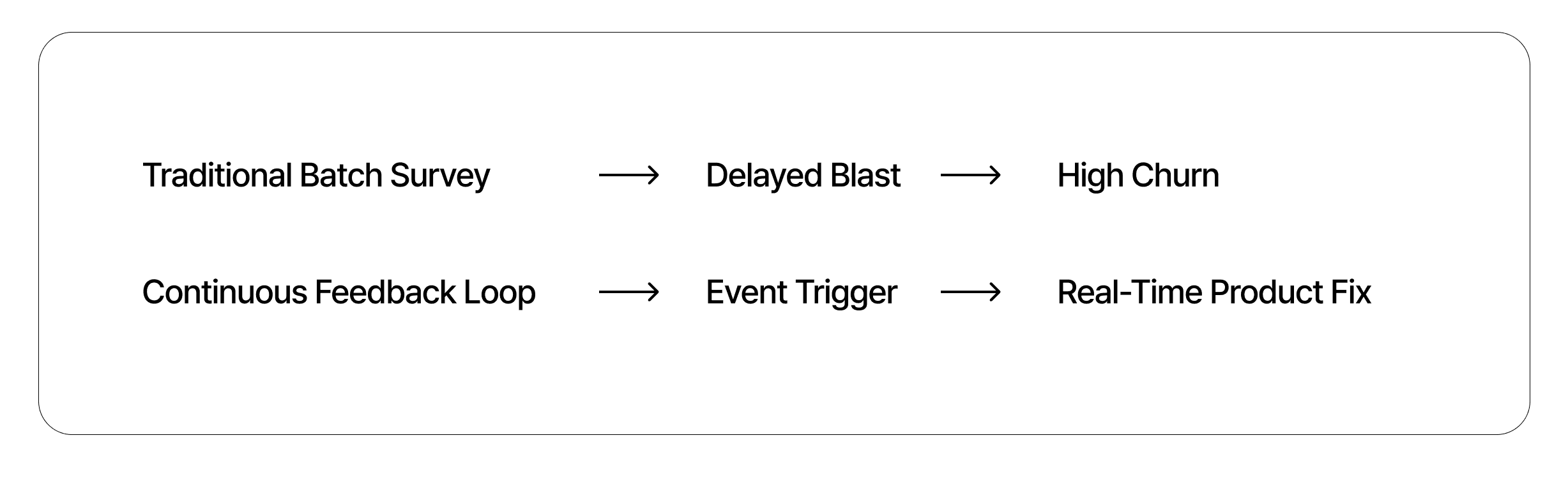
This guide outlines the practical implementation of an event-driven feedback framework. We will define the 4-stage architecture of a continuous feedback loop and demonstrate how to leverage Walla’s flexible in-app ingestion tools to capture real-time sentiments and route them directly into your existing development and customer success stacks.
2. The 4 Stages of a Continuous Feedback Loop
An effective feedback architecture operates as a programmatic cycle rather than a linear data-gathering exercise. To build a system that actively prevents customer churn and accelerates product development, your feedback infrastructure must systematically execute four distinct technical phases.
Stage 1: Capture (Contextual Ingestion)
The first phase replaces generalized, mass-distribution forms with targeted, event-triggered widgets placed directly inside the user interface.
Behavioral Interception: Rather than guessing when to solicit user opinions, surveys are bound to explicit user-action milestones or friction signs (e.g., repeating an action multiple times, dwelling on a billing page, or attempting to cancel a service).
Context Optimization: By presenting a localized, minimalist micro-form precisely when the user interacts with a specific feature, the system captures immediate, hyper-focused sentiment data before memory decay occurs.
Stage 2: Triage (Automated Routing & Prioritization)
Raw customer input lacks operational context without accounting parameters. In this phase, incoming feedback text and numerical scores are combined with existing customer accounting records.
Metadata Enrichment: The system maps the survey submission payload to backend user profiles, automatically injecting parameters such as account tier, Annual Recurring Revenue (ARR), contract renewal dates, and user permission levels (e.g., Workspace Admin vs. Read-Only Member).
Algorithmic Sorting: Incoming submissions are automatically sorted using these parameters. For instance, a critical bug reported by an enterprise-tier client is flagged for immediate resolution, while general feature requests from free-tier accounts are routed to long-term ideation queues.
Stage 3: Act (Operationalizing the Backlog)
Feedback must move out of isolated database tables and into the software tools your product and engineering teams use every day.
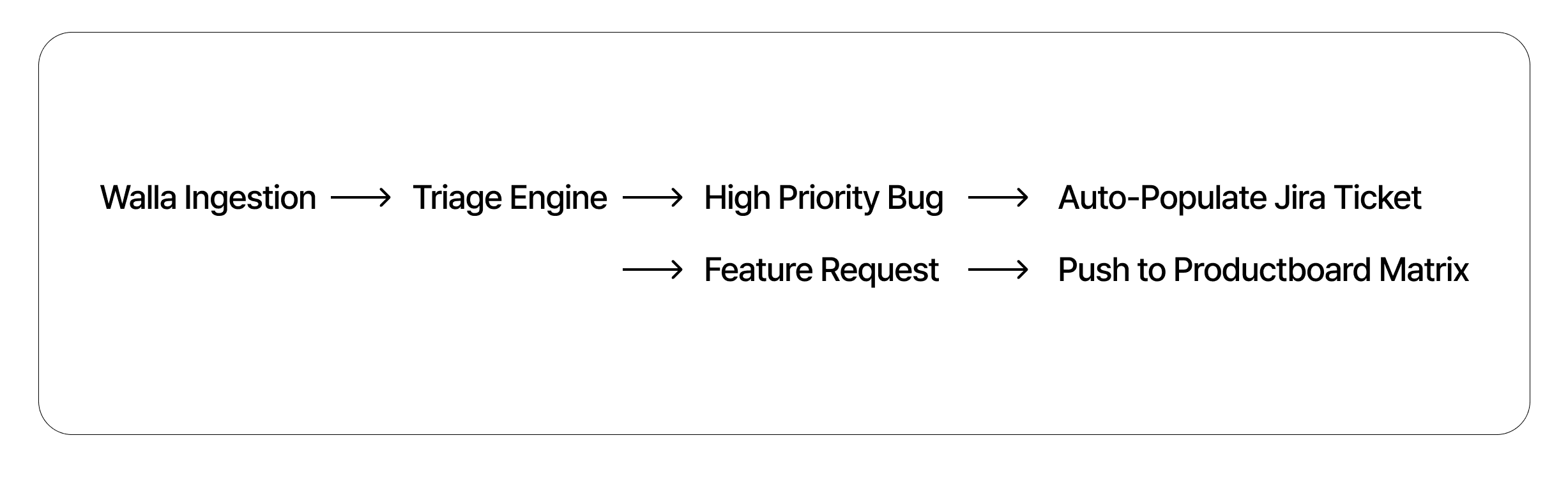
Direct Stack Integration: Validated, high-priority issues bypass manual product management review.
Backlog Automation: Technical defects automatically populate functional bug tickets within development environments like Jira or GitHub Issues. Meanwhile, qualitative product suggestions are structured and fed straight into product management suites like Productboard to inform upcoming sprint planning.
Stage 4: Close the Loop (Re-engaging the User)
The final phase transforms an automated data channel into a visible, user-retention asset. Closing the loop acknowledges the user's contribution and directly addresses their input.
Targeted Product Announcements: When a specific feature optimization or bug patch is pushed to production, the system queries the historical feedback database to identify the exact cohort of users who initially flagged that issue.
Retention Benefits: The system fires an automated, highly personalized notification (via in-app message or email) stating: "You recently shared feedback regarding Feature X—we have successfully deployed the requested update to your workspace." This directly reinforces user loyalty and encourages continued participation in the feedback pipeline.
3. Contextual In-App Triggering Strategies
Deploying a continuous feedback mechanism requires precise timing. If you prompt a user for feedback at random intervals, you disrupt their workflow and lower response quality. To get actionable insights, you must map your survey triggers to specific milestones and behavioral signals across the user journey.
(1) The Post-Onboarding Milestone (Days 7–14)
The initial two weeks of a user’s lifecycle determine long-term account retention. During this window, your feedback mechanics should split users into two distinct cohorts based on product usage data.
The Activation Group (Hit the "Aha-Moment"): For users who successfully complete your product's core value actions (e.g., inviting a team member or connecting a data source), trigger a micro-survey to discover what made the setup process easy.
The At-Risk Group (Missed the Milestone): For users who sign up but do not reach key activation milestones within 10 days, trigger a targeted in-app widget. Focus the questions on identifying onboarding friction points, such as: "Where did you get stuck during setup?" This approach captures specific friction data before the user completely abandons the application.
(2) Feature Abandonment Zones
When a user initiates a multi-step workflow—such as setting up an analytics dashboard, configuring an API integration, or running a complex data export—and cancels midway, it signals a clear UX flaw or technical blocker.
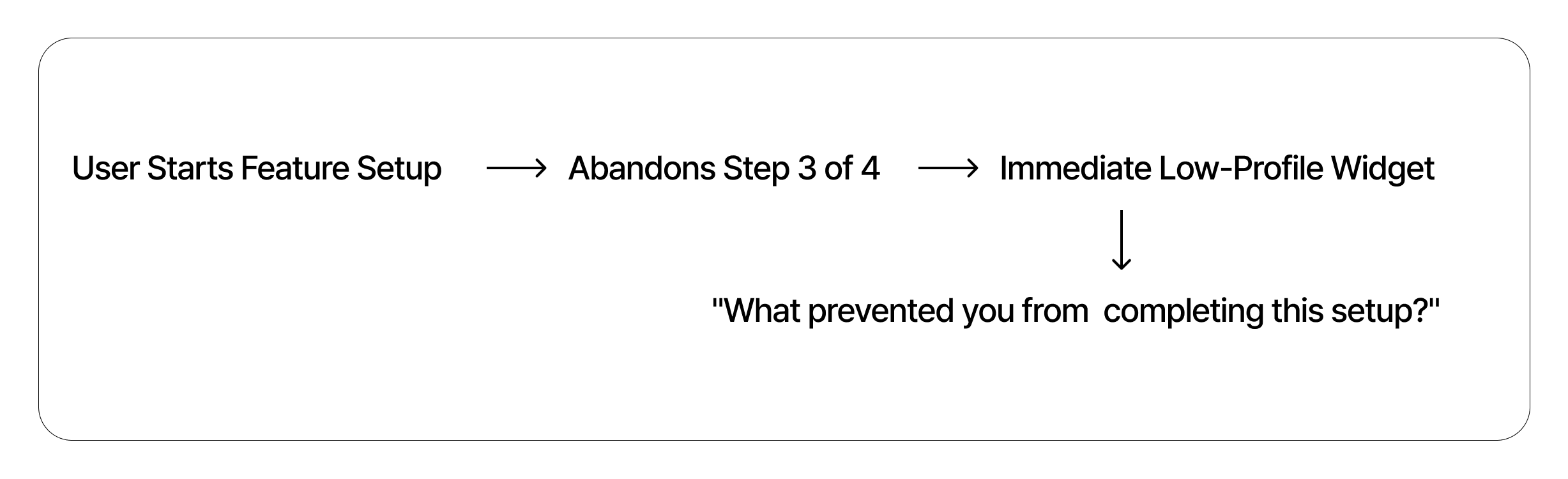
Real-Time Micro-Prompts: The moment a user exits a critical setup wizard before completion, display a low-profile inline question widget right where the abandonment occurred.
Capturing Direct Context: Asking a single, focused question—like "What prevented you from completing your dashboard setup just now?"—yields highly accurate design feedback because the friction is fresh in the user's mind.
3. Subscription Cancellation & Exit Intent
Relying on an open-ended, optional text box on your billing cancellation page makes it incredibly difficult to systematically analyze why users leave. Instead, you should use structured, conditional logic to turn exit behavior into actionable data.
Dynamic Choice Categorization: When a user clicks "Cancel Subscription," replace the generic text block with a multi-branch logic form.
Conditional Deep Dives: If the user selects “Missing Features,” use dynamic routing to display a secondary question asking them to specify the required tool. If they select “System Bugs,” prompt them for an error description.
This approach converts a churn event into a cleanly structured, categorical dataset (e.g., pricing vs. stability vs. utility), allowing your product team to easily identify and prioritize the root causes of customer loss.
4. Automated Data Flow: Connecting Sentiment to Dev & CS Stacks
In-app customer feedback loses its operational value if it remains locked inside an isolated database. To turn qualitative user insights into actual product updates, the data must flow automatically into the project management and customer success tools your internal teams use every day.
Walla utilizes an event-driven webhook architecture to route user sentiment directly to respective engineering backlogs and customer triumph workflows.
The Integrated Sentiment Data Pipeline
The following workflow maps the real-time path of a user response from initial frontend ingestion to specialized internal destinations:
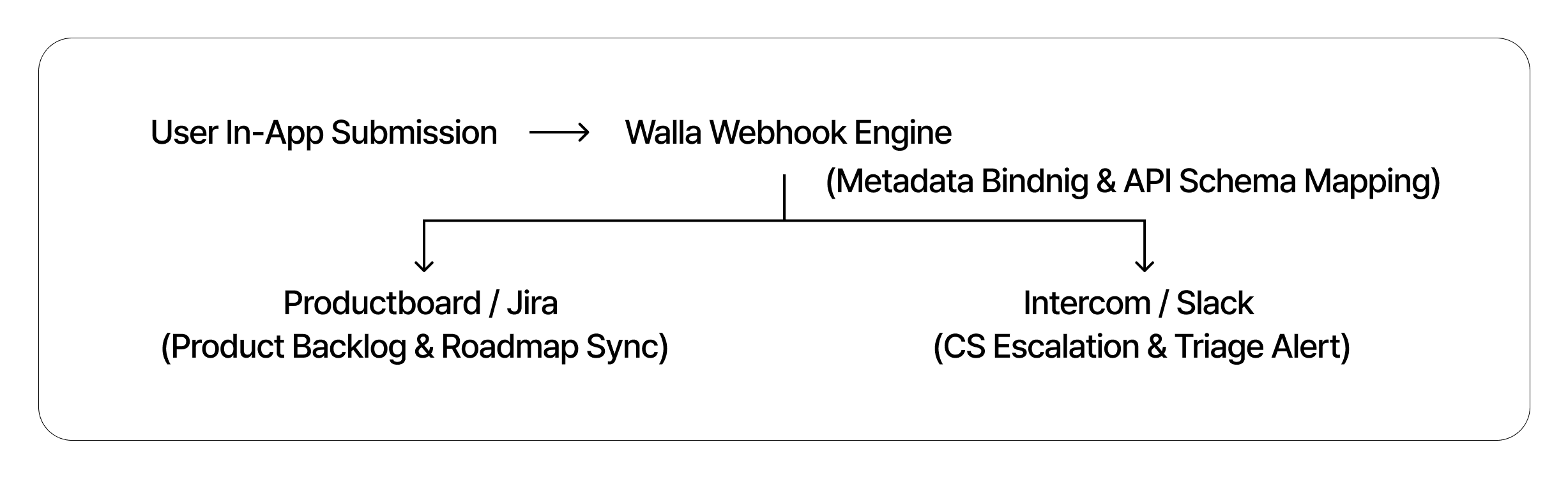
The Ingestion Layer: The user interacts with an inline or modal form embedded natively within the SaaS application.
The Webhook Dispatcher: Walla compiles the form answers and structural metadata into a standardized JSON payload, immediately firing it to automated middleware (such as Zapier, Make, or custom internal endpoints).
The Technical Stack (Productboard/Jira): Quantitative and feature-related inputs route to product discovery engines to inform feature prioritization and bug tickets.
The Customer Stack (Intercom/Slack): Urgent complaints, high-churn signals, or high-value enterprise accounts are flagged for customer success managers to handle immediate mitigation.
The Metadata Binding Principle: Preserving Business Context
The most common point of failure in standard feedback pipelines is the collection of "blind text"—raw feature suggestions completely detached from business realities. Knowing a user dislikes an interface is unhelpful unless you know which user is complaining.
To solve this, Walla supports programmatic Metadata Binding. When an in-app survey module loads inside your application, you can pass background user properties directly into hidden fields or custom variables within the form URL string.
JSON
By appending this data to the outbound JSON payload, your downstream systems don't just receive a raw comment; they receive an enriched ticket showing exactly who is experiencing friction.
Downstream Execution Vectors
Productboard & Jira Routing: If the payload contains
"company_size_tier": "500-1000"and"current_plan": "Enterprise Tier", the webhook filter can automatically route the feature request to your Productboard Inbox with an elevated priority status. This ensures enterprise feedback is factored directly into core roadmap calculations.Intercom & Slack Routing: If an enterprise account submits a low satisfaction score, the webhook instantly triggers an urgent Intercom conversation assigned to their dedicated account manager, while firing an automated notification to an internal
#enterprise-churn-watchSlack channel. This allows your team to initiate proactive outreach within minutes of the user's negative experience.
5. Data Governance & Signal-to-Noise Optimization
Scaling your data ingestion channels introduces two operational risks: survey fatigue for your users and alert fatigue for your engineering teams. If your in-app prompts interrupt core workflows indiscriminately, you degrade the user experience. Similarly, if your webhook pipeline passes every unrefined user comment straight into your engineering backlog, your development team will quickly ignore the incoming data stream.
Managing a successful feedback infrastructure requires strict data governance to keep the signal-to-noise ratio low.
In-App Survey Fatigue Management: Implementing Frequency Capping
Popups that disrupt a user's workflow can frustrate customers and lower response quality. To preserve the user experience, you must control the timing, volume, and targeting of your in-app forms using Frequency Capping rules.
Cooldown Windows: Implement global governance rules to ensure an individual user is never prompted with a survey more than once every 30 to 60 days, regardless of how many internal feature triggers they activate.
Segment Isolation: Isolate surveys so they only target specific user actions. For example, if you are testing a new billing page configuration, ensure the feedback module appears only for account owners who have visited the subscription page twice within 7 days, while completely hiding it from general day-to-day users.
The Priority Scoring System: Infrastructure-Level Filtering
Every user request does not carry the same technical or financial weight. An engineering team that spends its time reviewing minor feature suggestions from free-trial users will lack the resources to address critical stability issues affecting high-value enterprise accounts.
To protect your development resources, you must implement an automated priority sorting mechanism at the webhook infrastructure layer.
Automated Routing Gates: Configure your integration middleware (such as Zapier or an internal API gateway) to evaluate the incoming metadata payload before generating external workspace tickets.
The High-Value Path: If an incoming submission contains an explicit bug report and is tagged with an enterprise ARR value over a certain threshold, the system skips manual triage and automatically opens an urgent, high-priority ticket in Jira.
The Low-Priority Queue: Conversely, if the payload originates from a free-tier user or is categorized as a general feature idea rather than an active system failure, the system routes the input silently into a long-term backlog inside Productboard.
This infrastructure-level filtering keeps your development teams focused on addressing critical infrastructure vulnerabilities and high-value customer needs, while preventing non-essential feedback from disrupting day-to-day operations.
6. Conclusion: The Fastest Feedback Loop Wins
In the subscription economy, the long-term viability of a SaaS platform is not determined simply by how many features an engineering team can build in a single sprint. Instead, it depends on Feedback Velocity—the speed at which an organization can capture real-world user friction, triage the underlying structural issue, and deploy a corrected code patch back to production.
Shifting away from static, batch-style email forms toward a continuous, event-driven feedback pipeline embedded directly within the application layout is a fundamental requirement of modern Product-Led Growth (PLG). By configuring precise in-app triggers, capturing rich metadata context, and filtering noise at the webhook layer, your organization bridges the gap between customer sentiment and development execution.
When you reduce the time it takes to hear, understand, and fix a customer's problem, you eliminate the silent friction that drives account cancellation. The software company that builds the tightest, fastest data loop doesn't just collect better insights—it structurally defends its net revenue retention.
Optimize Your Product's Feedback Velocity
Capture real-time user friction points directly inside your application and route actionable data straight to your engineering and customer success environments.
Moving Beyond Quarterly Surveys to In-App, Event-Driven Sentiment Capture with Walla
1. The Death of the Batch Survey
The modern B2B and B2C SaaS landscapes are defined by extreme feature saturation and historically low customer switching costs. When a user encounters a broken workflow, a confusing user interface, or recurring system friction, they rarely take the time to submit a detailed IT support ticket. Instead, they quietly disengage, open a competitor's tab, and migrate their data. The velocity of user churn has outpaced traditional retention strategies.
The Problem: The Inefficiency of Reactive "Post-Mortem" Surveys
Many software companies still rely on legacy feedback mechanisms: blasting a massive, generalized Net Promoter Score (NPS) or Customer Satisfaction (CSAT) questionnaire via email every quarter or fiscal year. This approach introduces two fatal flaws into your product operations:
Lagging Indicators: Emailing a user three months after an incident is an operational post-mortem. By the time the questionnaire lands in their inbox, dissatisfied accounts have frequently already made the decision to churn.
Contextual Memory Decay: Human memory degrades rapidly. When asked a retrospective question about product utility weeks after the fact, users forget the specific UI friction point, the missing integration constraint, or the exact error sequence they experienced. They provide generalized, unactionable scores rather than precise product data.
The Product Ops Reality: Traditional batch surveys measure delayed sentiment, not real-time product friction. To build a highly sticky product, you must capture the user's voice while their hand is still on the mouse.
The Objective: Architecting a Continuous Feedback Loop
To survive in a product-led growth (PLG) ecosystem, software teams must transition from episodic surveys to a Continuous Feedback Loop. This strategy focuses on intercepting user sentiment at precise interaction milestones within the software.
This guide outlines the practical implementation of an event-driven feedback framework. We will define the 4-stage architecture of a continuous feedback loop and demonstrate how to leverage Walla’s flexible in-app ingestion tools to capture real-time sentiments and route them directly into your existing development and customer success stacks.
2. The 4 Stages of a Continuous Feedback Loop
An effective feedback architecture operates as a programmatic cycle rather than a linear data-gathering exercise. To build a system that actively prevents customer churn and accelerates product development, your feedback infrastructure must systematically execute four distinct technical phases.
Stage 1: Capture (Contextual Ingestion)
The first phase replaces generalized, mass-distribution forms with targeted, event-triggered widgets placed directly inside the user interface.
Behavioral Interception: Rather than guessing when to solicit user opinions, surveys are bound to explicit user-action milestones or friction signs (e.g., repeating an action multiple times, dwelling on a billing page, or attempting to cancel a service).
Context Optimization: By presenting a localized, minimalist micro-form precisely when the user interacts with a specific feature, the system captures immediate, hyper-focused sentiment data before memory decay occurs.
Stage 2: Triage (Automated Routing & Prioritization)
Raw customer input lacks operational context without accounting parameters. In this phase, incoming feedback text and numerical scores are combined with existing customer accounting records.
Metadata Enrichment: The system maps the survey submission payload to backend user profiles, automatically injecting parameters such as account tier, Annual Recurring Revenue (ARR), contract renewal dates, and user permission levels (e.g., Workspace Admin vs. Read-Only Member).
Algorithmic Sorting: Incoming submissions are automatically sorted using these parameters. For instance, a critical bug reported by an enterprise-tier client is flagged for immediate resolution, while general feature requests from free-tier accounts are routed to long-term ideation queues.
Stage 3: Act (Operationalizing the Backlog)
Feedback must move out of isolated database tables and into the software tools your product and engineering teams use every day.
Direct Stack Integration: Validated, high-priority issues bypass manual product management review.
Backlog Automation: Technical defects automatically populate functional bug tickets within development environments like Jira or GitHub Issues. Meanwhile, qualitative product suggestions are structured and fed straight into product management suites like Productboard to inform upcoming sprint planning.
Stage 4: Close the Loop (Re-engaging the User)
The final phase transforms an automated data channel into a visible, user-retention asset. Closing the loop acknowledges the user's contribution and directly addresses their input.
Targeted Product Announcements: When a specific feature optimization or bug patch is pushed to production, the system queries the historical feedback database to identify the exact cohort of users who initially flagged that issue.
Retention Benefits: The system fires an automated, highly personalized notification (via in-app message or email) stating: "You recently shared feedback regarding Feature X—we have successfully deployed the requested update to your workspace." This directly reinforces user loyalty and encourages continued participation in the feedback pipeline.
3. Contextual In-App Triggering Strategies
Deploying a continuous feedback mechanism requires precise timing. If you prompt a user for feedback at random intervals, you disrupt their workflow and lower response quality. To get actionable insights, you must map your survey triggers to specific milestones and behavioral signals across the user journey.
(1) The Post-Onboarding Milestone (Days 7–14)
The initial two weeks of a user’s lifecycle determine long-term account retention. During this window, your feedback mechanics should split users into two distinct cohorts based on product usage data.
The Activation Group (Hit the "Aha-Moment"): For users who successfully complete your product's core value actions (e.g., inviting a team member or connecting a data source), trigger a micro-survey to discover what made the setup process easy.
The At-Risk Group (Missed the Milestone): For users who sign up but do not reach key activation milestones within 10 days, trigger a targeted in-app widget. Focus the questions on identifying onboarding friction points, such as: "Where did you get stuck during setup?" This approach captures specific friction data before the user completely abandons the application.
(2) Feature Abandonment Zones
When a user initiates a multi-step workflow—such as setting up an analytics dashboard, configuring an API integration, or running a complex data export—and cancels midway, it signals a clear UX flaw or technical blocker.
Real-Time Micro-Prompts: The moment a user exits a critical setup wizard before completion, display a low-profile inline question widget right where the abandonment occurred.
Capturing Direct Context: Asking a single, focused question—like "What prevented you from completing your dashboard setup just now?"—yields highly accurate design feedback because the friction is fresh in the user's mind.
3. Subscription Cancellation & Exit Intent
Relying on an open-ended, optional text box on your billing cancellation page makes it incredibly difficult to systematically analyze why users leave. Instead, you should use structured, conditional logic to turn exit behavior into actionable data.
Dynamic Choice Categorization: When a user clicks "Cancel Subscription," replace the generic text block with a multi-branch logic form.
Conditional Deep Dives: If the user selects “Missing Features,” use dynamic routing to display a secondary question asking them to specify the required tool. If they select “System Bugs,” prompt them for an error description.
This approach converts a churn event into a cleanly structured, categorical dataset (e.g., pricing vs. stability vs. utility), allowing your product team to easily identify and prioritize the root causes of customer loss.
4. Automated Data Flow: Connecting Sentiment to Dev & CS Stacks
In-app customer feedback loses its operational value if it remains locked inside an isolated database. To turn qualitative user insights into actual product updates, the data must flow automatically into the project management and customer success tools your internal teams use every day.
Walla utilizes an event-driven webhook architecture to route user sentiment directly to respective engineering backlogs and customer triumph workflows.
The Integrated Sentiment Data Pipeline
The following workflow maps the real-time path of a user response from initial frontend ingestion to specialized internal destinations:
The Ingestion Layer: The user interacts with an inline or modal form embedded natively within the SaaS application.
The Webhook Dispatcher: Walla compiles the form answers and structural metadata into a standardized JSON payload, immediately firing it to automated middleware (such as Zapier, Make, or custom internal endpoints).
The Technical Stack (Productboard/Jira): Quantitative and feature-related inputs route to product discovery engines to inform feature prioritization and bug tickets.
The Customer Stack (Intercom/Slack): Urgent complaints, high-churn signals, or high-value enterprise accounts are flagged for customer success managers to handle immediate mitigation.
The Metadata Binding Principle: Preserving Business Context
The most common point of failure in standard feedback pipelines is the collection of "blind text"—raw feature suggestions completely detached from business realities. Knowing a user dislikes an interface is unhelpful unless you know which user is complaining.
To solve this, Walla supports programmatic Metadata Binding. When an in-app survey module loads inside your application, you can pass background user properties directly into hidden fields or custom variables within the form URL string.
JSON
By appending this data to the outbound JSON payload, your downstream systems don't just receive a raw comment; they receive an enriched ticket showing exactly who is experiencing friction.
Downstream Execution Vectors
Productboard & Jira Routing: If the payload contains
"company_size_tier": "500-1000"and"current_plan": "Enterprise Tier", the webhook filter can automatically route the feature request to your Productboard Inbox with an elevated priority status. This ensures enterprise feedback is factored directly into core roadmap calculations.Intercom & Slack Routing: If an enterprise account submits a low satisfaction score, the webhook instantly triggers an urgent Intercom conversation assigned to their dedicated account manager, while firing an automated notification to an internal
#enterprise-churn-watchSlack channel. This allows your team to initiate proactive outreach within minutes of the user's negative experience.
5. Data Governance & Signal-to-Noise Optimization
Scaling your data ingestion channels introduces two operational risks: survey fatigue for your users and alert fatigue for your engineering teams. If your in-app prompts interrupt core workflows indiscriminately, you degrade the user experience. Similarly, if your webhook pipeline passes every unrefined user comment straight into your engineering backlog, your development team will quickly ignore the incoming data stream.
Managing a successful feedback infrastructure requires strict data governance to keep the signal-to-noise ratio low.
In-App Survey Fatigue Management: Implementing Frequency Capping
Popups that disrupt a user's workflow can frustrate customers and lower response quality. To preserve the user experience, you must control the timing, volume, and targeting of your in-app forms using Frequency Capping rules.
Cooldown Windows: Implement global governance rules to ensure an individual user is never prompted with a survey more than once every 30 to 60 days, regardless of how many internal feature triggers they activate.
Segment Isolation: Isolate surveys so they only target specific user actions. For example, if you are testing a new billing page configuration, ensure the feedback module appears only for account owners who have visited the subscription page twice within 7 days, while completely hiding it from general day-to-day users.
The Priority Scoring System: Infrastructure-Level Filtering
Every user request does not carry the same technical or financial weight. An engineering team that spends its time reviewing minor feature suggestions from free-trial users will lack the resources to address critical stability issues affecting high-value enterprise accounts.
To protect your development resources, you must implement an automated priority sorting mechanism at the webhook infrastructure layer.
Automated Routing Gates: Configure your integration middleware (such as Zapier or an internal API gateway) to evaluate the incoming metadata payload before generating external workspace tickets.
The High-Value Path: If an incoming submission contains an explicit bug report and is tagged with an enterprise ARR value over a certain threshold, the system skips manual triage and automatically opens an urgent, high-priority ticket in Jira.
The Low-Priority Queue: Conversely, if the payload originates from a free-tier user or is categorized as a general feature idea rather than an active system failure, the system routes the input silently into a long-term backlog inside Productboard.
This infrastructure-level filtering keeps your development teams focused on addressing critical infrastructure vulnerabilities and high-value customer needs, while preventing non-essential feedback from disrupting day-to-day operations.
6. Conclusion: The Fastest Feedback Loop Wins
In the subscription economy, the long-term viability of a SaaS platform is not determined simply by how many features an engineering team can build in a single sprint. Instead, it depends on Feedback Velocity—the speed at which an organization can capture real-world user friction, triage the underlying structural issue, and deploy a corrected code patch back to production.
Shifting away from static, batch-style email forms toward a continuous, event-driven feedback pipeline embedded directly within the application layout is a fundamental requirement of modern Product-Led Growth (PLG). By configuring precise in-app triggers, capturing rich metadata context, and filtering noise at the webhook layer, your organization bridges the gap between customer sentiment and development execution.
When you reduce the time it takes to hear, understand, and fix a customer's problem, you eliminate the silent friction that drives account cancellation. The software company that builds the tightest, fastest data loop doesn't just collect better insights—it structurally defends its net revenue retention.
Optimize Your Product's Feedback Velocity
Capture real-time user friction points directly inside your application and route actionable data straight to your engineering and customer success environments.
Moving Beyond Quarterly Surveys to In-App, Event-Driven Sentiment Capture with Walla
1. The Death of the Batch Survey
The modern B2B and B2C SaaS landscapes are defined by extreme feature saturation and historically low customer switching costs. When a user encounters a broken workflow, a confusing user interface, or recurring system friction, they rarely take the time to submit a detailed IT support ticket. Instead, they quietly disengage, open a competitor's tab, and migrate their data. The velocity of user churn has outpaced traditional retention strategies.
The Problem: The Inefficiency of Reactive "Post-Mortem" Surveys
Many software companies still rely on legacy feedback mechanisms: blasting a massive, generalized Net Promoter Score (NPS) or Customer Satisfaction (CSAT) questionnaire via email every quarter or fiscal year. This approach introduces two fatal flaws into your product operations:
Lagging Indicators: Emailing a user three months after an incident is an operational post-mortem. By the time the questionnaire lands in their inbox, dissatisfied accounts have frequently already made the decision to churn.
Contextual Memory Decay: Human memory degrades rapidly. When asked a retrospective question about product utility weeks after the fact, users forget the specific UI friction point, the missing integration constraint, or the exact error sequence they experienced. They provide generalized, unactionable scores rather than precise product data.
The Product Ops Reality: Traditional batch surveys measure delayed sentiment, not real-time product friction. To build a highly sticky product, you must capture the user's voice while their hand is still on the mouse.
The Objective: Architecting a Continuous Feedback Loop
To survive in a product-led growth (PLG) ecosystem, software teams must transition from episodic surveys to a Continuous Feedback Loop. This strategy focuses on intercepting user sentiment at precise interaction milestones within the software.
This guide outlines the practical implementation of an event-driven feedback framework. We will define the 4-stage architecture of a continuous feedback loop and demonstrate how to leverage Walla’s flexible in-app ingestion tools to capture real-time sentiments and route them directly into your existing development and customer success stacks.
2. The 4 Stages of a Continuous Feedback Loop
An effective feedback architecture operates as a programmatic cycle rather than a linear data-gathering exercise. To build a system that actively prevents customer churn and accelerates product development, your feedback infrastructure must systematically execute four distinct technical phases.
Stage 1: Capture (Contextual Ingestion)
The first phase replaces generalized, mass-distribution forms with targeted, event-triggered widgets placed directly inside the user interface.
Behavioral Interception: Rather than guessing when to solicit user opinions, surveys are bound to explicit user-action milestones or friction signs (e.g., repeating an action multiple times, dwelling on a billing page, or attempting to cancel a service).
Context Optimization: By presenting a localized, minimalist micro-form precisely when the user interacts with a specific feature, the system captures immediate, hyper-focused sentiment data before memory decay occurs.
Stage 2: Triage (Automated Routing & Prioritization)
Raw customer input lacks operational context without accounting parameters. In this phase, incoming feedback text and numerical scores are combined with existing customer accounting records.
Metadata Enrichment: The system maps the survey submission payload to backend user profiles, automatically injecting parameters such as account tier, Annual Recurring Revenue (ARR), contract renewal dates, and user permission levels (e.g., Workspace Admin vs. Read-Only Member).
Algorithmic Sorting: Incoming submissions are automatically sorted using these parameters. For instance, a critical bug reported by an enterprise-tier client is flagged for immediate resolution, while general feature requests from free-tier accounts are routed to long-term ideation queues.
Stage 3: Act (Operationalizing the Backlog)
Feedback must move out of isolated database tables and into the software tools your product and engineering teams use every day.
Direct Stack Integration: Validated, high-priority issues bypass manual product management review.
Backlog Automation: Technical defects automatically populate functional bug tickets within development environments like Jira or GitHub Issues. Meanwhile, qualitative product suggestions are structured and fed straight into product management suites like Productboard to inform upcoming sprint planning.
Stage 4: Close the Loop (Re-engaging the User)
The final phase transforms an automated data channel into a visible, user-retention asset. Closing the loop acknowledges the user's contribution and directly addresses their input.
Targeted Product Announcements: When a specific feature optimization or bug patch is pushed to production, the system queries the historical feedback database to identify the exact cohort of users who initially flagged that issue.
Retention Benefits: The system fires an automated, highly personalized notification (via in-app message or email) stating: "You recently shared feedback regarding Feature X—we have successfully deployed the requested update to your workspace." This directly reinforces user loyalty and encourages continued participation in the feedback pipeline.
3. Contextual In-App Triggering Strategies
Deploying a continuous feedback mechanism requires precise timing. If you prompt a user for feedback at random intervals, you disrupt their workflow and lower response quality. To get actionable insights, you must map your survey triggers to specific milestones and behavioral signals across the user journey.
(1) The Post-Onboarding Milestone (Days 7–14)
The initial two weeks of a user’s lifecycle determine long-term account retention. During this window, your feedback mechanics should split users into two distinct cohorts based on product usage data.
The Activation Group (Hit the "Aha-Moment"): For users who successfully complete your product's core value actions (e.g., inviting a team member or connecting a data source), trigger a micro-survey to discover what made the setup process easy.
The At-Risk Group (Missed the Milestone): For users who sign up but do not reach key activation milestones within 10 days, trigger a targeted in-app widget. Focus the questions on identifying onboarding friction points, such as: "Where did you get stuck during setup?" This approach captures specific friction data before the user completely abandons the application.
(2) Feature Abandonment Zones
When a user initiates a multi-step workflow—such as setting up an analytics dashboard, configuring an API integration, or running a complex data export—and cancels midway, it signals a clear UX flaw or technical blocker.
Real-Time Micro-Prompts: The moment a user exits a critical setup wizard before completion, display a low-profile inline question widget right where the abandonment occurred.
Capturing Direct Context: Asking a single, focused question—like "What prevented you from completing your dashboard setup just now?"—yields highly accurate design feedback because the friction is fresh in the user's mind.
3. Subscription Cancellation & Exit Intent
Relying on an open-ended, optional text box on your billing cancellation page makes it incredibly difficult to systematically analyze why users leave. Instead, you should use structured, conditional logic to turn exit behavior into actionable data.
Dynamic Choice Categorization: When a user clicks "Cancel Subscription," replace the generic text block with a multi-branch logic form.
Conditional Deep Dives: If the user selects “Missing Features,” use dynamic routing to display a secondary question asking them to specify the required tool. If they select “System Bugs,” prompt them for an error description.
This approach converts a churn event into a cleanly structured, categorical dataset (e.g., pricing vs. stability vs. utility), allowing your product team to easily identify and prioritize the root causes of customer loss.
4. Automated Data Flow: Connecting Sentiment to Dev & CS Stacks
In-app customer feedback loses its operational value if it remains locked inside an isolated database. To turn qualitative user insights into actual product updates, the data must flow automatically into the project management and customer success tools your internal teams use every day.
Walla utilizes an event-driven webhook architecture to route user sentiment directly to respective engineering backlogs and customer triumph workflows.
The Integrated Sentiment Data Pipeline
The following workflow maps the real-time path of a user response from initial frontend ingestion to specialized internal destinations:
The Ingestion Layer: The user interacts with an inline or modal form embedded natively within the SaaS application.
The Webhook Dispatcher: Walla compiles the form answers and structural metadata into a standardized JSON payload, immediately firing it to automated middleware (such as Zapier, Make, or custom internal endpoints).
The Technical Stack (Productboard/Jira): Quantitative and feature-related inputs route to product discovery engines to inform feature prioritization and bug tickets.
The Customer Stack (Intercom/Slack): Urgent complaints, high-churn signals, or high-value enterprise accounts are flagged for customer success managers to handle immediate mitigation.
The Metadata Binding Principle: Preserving Business Context
The most common point of failure in standard feedback pipelines is the collection of "blind text"—raw feature suggestions completely detached from business realities. Knowing a user dislikes an interface is unhelpful unless you know which user is complaining.
To solve this, Walla supports programmatic Metadata Binding. When an in-app survey module loads inside your application, you can pass background user properties directly into hidden fields or custom variables within the form URL string.
JSON
By appending this data to the outbound JSON payload, your downstream systems don't just receive a raw comment; they receive an enriched ticket showing exactly who is experiencing friction.
Downstream Execution Vectors
Productboard & Jira Routing: If the payload contains
"company_size_tier": "500-1000"and"current_plan": "Enterprise Tier", the webhook filter can automatically route the feature request to your Productboard Inbox with an elevated priority status. This ensures enterprise feedback is factored directly into core roadmap calculations.Intercom & Slack Routing: If an enterprise account submits a low satisfaction score, the webhook instantly triggers an urgent Intercom conversation assigned to their dedicated account manager, while firing an automated notification to an internal
#enterprise-churn-watchSlack channel. This allows your team to initiate proactive outreach within minutes of the user's negative experience.
5. Data Governance & Signal-to-Noise Optimization
Scaling your data ingestion channels introduces two operational risks: survey fatigue for your users and alert fatigue for your engineering teams. If your in-app prompts interrupt core workflows indiscriminately, you degrade the user experience. Similarly, if your webhook pipeline passes every unrefined user comment straight into your engineering backlog, your development team will quickly ignore the incoming data stream.
Managing a successful feedback infrastructure requires strict data governance to keep the signal-to-noise ratio low.
In-App Survey Fatigue Management: Implementing Frequency Capping
Popups that disrupt a user's workflow can frustrate customers and lower response quality. To preserve the user experience, you must control the timing, volume, and targeting of your in-app forms using Frequency Capping rules.
Cooldown Windows: Implement global governance rules to ensure an individual user is never prompted with a survey more than once every 30 to 60 days, regardless of how many internal feature triggers they activate.
Segment Isolation: Isolate surveys so they only target specific user actions. For example, if you are testing a new billing page configuration, ensure the feedback module appears only for account owners who have visited the subscription page twice within 7 days, while completely hiding it from general day-to-day users.
The Priority Scoring System: Infrastructure-Level Filtering
Every user request does not carry the same technical or financial weight. An engineering team that spends its time reviewing minor feature suggestions from free-trial users will lack the resources to address critical stability issues affecting high-value enterprise accounts.
To protect your development resources, you must implement an automated priority sorting mechanism at the webhook infrastructure layer.
Automated Routing Gates: Configure your integration middleware (such as Zapier or an internal API gateway) to evaluate the incoming metadata payload before generating external workspace tickets.
The High-Value Path: If an incoming submission contains an explicit bug report and is tagged with an enterprise ARR value over a certain threshold, the system skips manual triage and automatically opens an urgent, high-priority ticket in Jira.
The Low-Priority Queue: Conversely, if the payload originates from a free-tier user or is categorized as a general feature idea rather than an active system failure, the system routes the input silently into a long-term backlog inside Productboard.
This infrastructure-level filtering keeps your development teams focused on addressing critical infrastructure vulnerabilities and high-value customer needs, while preventing non-essential feedback from disrupting day-to-day operations.
6. Conclusion: The Fastest Feedback Loop Wins
In the subscription economy, the long-term viability of a SaaS platform is not determined simply by how many features an engineering team can build in a single sprint. Instead, it depends on Feedback Velocity—the speed at which an organization can capture real-world user friction, triage the underlying structural issue, and deploy a corrected code patch back to production.
Shifting away from static, batch-style email forms toward a continuous, event-driven feedback pipeline embedded directly within the application layout is a fundamental requirement of modern Product-Led Growth (PLG). By configuring precise in-app triggers, capturing rich metadata context, and filtering noise at the webhook layer, your organization bridges the gap between customer sentiment and development execution.
When you reduce the time it takes to hear, understand, and fix a customer's problem, you eliminate the silent friction that drives account cancellation. The software company that builds the tightest, fastest data loop doesn't just collect better insights—it structurally defends its net revenue retention.
Optimize Your Product's Feedback Velocity
Capture real-time user friction points directly inside your application and route actionable data straight to your engineering and customer success environments.