Event Registration Forms: Best Practices for High Conversion Rates in 2026
Yuvin Kim
15 thg 6, 2026
Event Registration Forms: Best Practices for High Conversion Rates in 2026
Yuvin Kim
15 thg 6, 2026
1. The 2026 Registration Landscape
The digital ecosystem is defined by a critical shortage of consumer attention. Audience focus has become highly fragmented, and users are more protective of their digital time than ever before.
If your event registration form looks like an administrative tax document—packed with seven or more mandatory, manual text inputs—you are actively driving potential attendees away. Current industry benchmarks indicate that traditional, multi-field registration forms suffer from an average abandonment rate of over 40%. Every unnecessary manual field asking a user to re-type information they have already saved elsewhere serves as a direct exit ramp from your conversion funnel.
The Paradigm Shift: From Roster Management to Frictionless UX
The days of viewing sign-up pages as mere spreadsheet collectors are gone.
The Modern Rule of Event Operations: Event registration is no longer an exercise in roster collection; it is the definitive first step of your attendee's product experience.
Registration must be designed as a frictionless journey. It begins the exact millisecond a prospect interacts with your invitation link and is only truly complete when the confirmed session is saved natively inside their personal calendar application. If your pipeline includes even a single point of friction—such as a forced password creation, a non-responsive layout, or a tedious manual credit card entry—your conversion velocity drops.
Objective of this Guide
To scale an audience for an inline webinar, a B2B summit, or a large-scale hybrid conference, you must modernize your data ingestion strategy.
This guide outlines the essential UX design principles and behavioral mechanics required to safeguard your sign-up conversion rates. We will explore how leading event organizers leverage Walla to build highly responsive, adaptive registration forms that seamlessly combine dynamic hybrid routing (in-person vs. virtual tracks), native single-tap payment infrastructure, and automated post-submission workflows.
2. 2026 Core Best Practices for Form UX
In 2026, maximizing your form's conversion rate requires removing every possible manual obstacle. High-performing forms are no longer passive lists of text fields; they act as smart, responsive interfaces that anticipate user data, secure transactions instantly, and use real-time psychological cues to encourage completion.
(1) Passwordless Authentication & One-Click Single Sign-On (SSO)
Forcing a user to create a new password or go through a clunky 6-digit email verification loop just to register for an event is an outdated digital hurdle. Every step away from the form to check an inbox increases the risk of the user abandoning the process.
Frictionless Authentication: Avoid complex verification loops that force users out of the registration funnel. Instead, utilize one-click Google, Apple, or LinkedIn Single Sign-On (SSO) built straight into the form container to secure authentication instantly.
Unified Identity Providers: Embed one-click Google, Apple, and LinkedIn SSO buttons at the very top of the form layout. Securing authentication instantly eliminates registration friction entirely.
(2) AI-Driven Profile Enriched Lookup
The most effective way to optimize form completion rates is simple: stop asking users to type out information you can find automatically. Requiring applicants to manually fill in their company name, precise job title, seniority level, and industry segment is a primary cause of form abandonment.
[ User Types Corporate Email ] ──> Dynamic API Enrichment Triggered │ ▼ [ Silent Backend Mapping ] • Fetches Job Title via LinkedIn API • Pulls Company Size & Industry • Populates CRM Fields Invisibly
Data Minimization: Keep the visible interface clean by asking only for the user's professional email address.
Invisibly Enriched Payloads: As soon as the domain is keyed in, Walla’s robust Webhook and API architecture can trigger a seamless data pipeline with your data enrichment ecosystem (such as Clay or Zapier) to automatically map company metrics, team size, and professional roles in the background. Your team gathers high-density data, while the user enjoys a form with only two visible fields.
(3) Mobile Wallet Integration & One-Touch Payments
If your event requires a paid ticket, the checkout step is often where your conversion pipeline is most vulnerable. Forcing a mobile user to pull out a physical credit card and manually type in a 16-digit card number, expiration date, and CVV code on a smartphone keyboard can devastate conversion rates.
Native Wallet Architecture: Embed secure, mobile-optimized checkout layers directly into the base form layout.
Frictionless Mobile Checkouts: Integrate secure, mobile-optimized payment layers directly within your registration loop. By offering integrated support for leading digital wallets and local card gateways (Toss Pay, KakaoPay, or global gateways), you eliminate the need for manual card entry, optimizing conversion rates even inside mobile in-app browsers.
(4) Floating Visual Urgency (Dynamic FOMO)
User procrastination is a constant challenge for conversion rates. If a user feels they can register "anytime," they often close the tab and forget to return. You can counter this behavioral pattern by adding real-time, visual scarcity triggers directly into the form wrapper.
Psychological Trigger: Scarcity and urgency drive immediate action. When users see availability dropping in real time, they are significantly more likely to complete their registration immediately.
Sticky Ticker Banners: Position a floating countdown timer or live inventory tracker at the top of the form view.
Real-Time Data Feeds: Display dynamic updates like "⚠️ Only 14 in-person passes remaining" or "Early-Bird pricing expires in 02h : 14m : 05s." Binding these tangible scarcity metrics directly to your actual seating capacity encourages immediate sign-ups, helping you capture demand while user intent is highest.
3. Dynamic Branching: Hybrid Event Routing
In 2026, events are rarely purely physical or entirely digital. Designing a registration form for a hybrid summit introduces a distinct structural challenge: you are managing two completely different audience profiles within a single landing page.
If you use a static, one-size-fits-all questionnaire, your virtual attendees will be forced to skip past irrelevant questions about hotel parking and lunch options. At the same time, your physical attendees might miss critical details about networking session capacities. To maintain a high conversion rate, your form needs to adapt instantly based on the user's selected attendance type.
The Hybrid Attendance Flow Architecture
By using real-time conditional logic, the form splits into two customized data collection pipelines the moment a user selects their attendance path:
Implementing Conditional Field Exposure
Walla’s conditional logic engine handles this routing seamlessly in the background. Instead of sending users to separate landing pages, you can dynamically show or hide fields on the fly. This approach keeps the interface clean and focused for every user.
Path A: The High-Touch In-Person Journey
When a registrant selects In-Person Attendance, the form immediately opens advanced logistics fields. These details are essential for managing physical venue capacities and vendor costs.
Logistics Filtering: The form expands to display a single-choice card question: "Will you be joining our VIP Networking Afterparty?"
Operational Specifics: If they select yes, the system opens a catering dropdown for dietary restrictions (e.g., Vegan, Gluten-Free) and a checkbox for on-site parking validation.
The UX Advantage: These fields only appear for the users who actually need them, ensuring your physical event coordination remains accurate without cluttering the form for digital attendees.
Path B: The Frictionless Virtual Journey
When a registrant clicks Virtual Attendance, the form instantly hides all venue logistics. Digital attendees have a completely different set of priorities, centered around access and schedule clarity.
Eliminating Form Fatigue: All questions about parking, seating, and food vanish. The virtual user skips directly to the final confirmation phase, avoiding unnecessary scrolling.
Smart Timezone Mapping: The backend reads the user’s local browser settings to automatically map their timezone, ensuring follow-up calendar invites display the correct local broadcast times.
Pre-Event Engagement: To add value to the digital experience, the form displays a single text input: "What burning question would you like our keynote speakers to answer live during the streaming session?" This captures high-intent audience data and improves pre-event engagement.
Operational Insight: Protecting your virtual registrants from physical venue questions can reduce digital form abandonment by up to 35%. A clean, targeted question path keeps user motivation high and drives more completions.
Now that the hybrid branching mechanics are mapped out, where should we focus next to round out this event registration guide: should we dive into Section 4: The Event Tech Stack and Automated Pipelines (Google Calendar links, HubSpot syncing, and Slack notifications), or should we build out Section 5: Designing the High-Conversion Post-Submission Thank You Page?
4. The Event Tech Stack: Seamless Automations
An event registration form does not operate in a vacuum. Pressing the "Submit" button shouldn't simply log an entry into an isolated database; it must serve as the primary webhook trigger for your entire marketing and operations ecosystem. In 2026, any delay or gap in data transfer between your registration form and your internal tools can result in lost revenue, inaccurate lead attribution, or higher event drop-out rates.
To ensure reliable data delivery, your registration backend must automatically push clean data payloads to your core software tools the moment a user signs up.
The Real-Time Event Integration Architecture
Target Platform (System) | Data Vector (Payload Mapping) | Operational Value (Business Intent) |
|---|---|---|
HubSpot / Salesforce | Registrant PII, Company Metadata, and UTM Lead Source. | Measures marketing campaign performance and automates Sales Lead (MQL) routing. |
Google Calendar / ICS Link | Event Date, Time, Description, and Access Credentials. | Offers one-click calendar scheduling to minimize event no-shows. |
Slack / Microsoft Teams | Custom Instant Alerts (e.g., "New VIP Ticket Purchased"). | Provides real-time visibility for on-site and virtual operational teams. |
Maximizing the Value of Your Automated Data Flows
(1) CRM Synchronization (HubSpot / Salesforce)
Tracking your acquisition channels accurately is essential for calculating your event's return on investment (ROI).
Attribution Mapping: Walla maps incoming registration data alongside hidden tracking elements, such as UTM parameters and tracking IDs.
Immediate Routing: This automated flow passes directly to your CRM, instantly creating or updating contact records. It tags the specific marketing campaign responsible for the sign-up and routes high-value corporate accounts to the appropriate sales representatives while user intent is highest.
(2) Frictionless Calendar Sync (Google Calendar / ICS)
The biggest threat to virtual webinars and hybrid sessions is the gap between registration and actual attendance. If an attendee has to manually create a calendar entry and copy over the access details, your attendance rates will drop.
Direct Calendar Injection: Your form infrastructure should generate dynamic calendar invitations immediately upon approval.
Reducing No-Shows: Linking these invites directly to the confirmation workflow allows users to save the event date, time, and target stream link (such as Zoom or YouTube Live) directly into their personal calendars with a single tap. This step secures a spot in their daily schedule and helps lower your event no-show rates.
(3) Real-Time Operations Alerts (Slack / Teams)
Managing a large-scale event requires clear, up-to-the-minute visibility into attendee sign-ups and ticket sales.
Instant Operational Visibility: By routing localized webhooks into your team's internal messaging channels (like
#event-2026-conversions), your coordinators can monitor registration activity as it happens.Targeted Team Actions: When high-value VIP tickets or enterprise registrations are completed, your team receives instant notification updates. This visibility helps your staff manage seating arrangements, adjust catering orders, or initiate high-touch executive welcome protocols without needing to manually refresh a database.
Now that the automated data pipeline is configured, let's optimize the final phase of the user experience. Should we proceed to Section 5: Maximizing Post-Submission Velocity to design a high-engagement Thank-You page that drives viral social sharing and calendar bookings?
5. Maximizing Post-Submission Velocity
Many event organizers treat the final "Thank You" page as a passive dead end. Displaying a plain text message like "Thank you for registering; we have sent a confirmation email" is a massive missed opportunity.
Psychologically, the exact millisecond a user clicks the "Submit" button is their point of peak engagement. They have just invested their time, cleared their schedule, and trusted you with their professional data. Instead of letting that momentum fade, a high-converting registration flow uses this high-intent window to drive secondary actions that secure attendance and lower your customer acquisition costs (CAC).
(1) The Centralized One-Click Calendar Invitation
Relying entirely on an email confirmation to get your event onto an attendee's calendar introduces unnecessary friction. Emails get caught in spam filters, lost in busy inboxes, or archived and forgotten.
Prominent Center Placement: Position a clear, high-contrast "Add to Calendar" button right in the center of your post-submission screen.
Unified Device Mapping: This element should use a single dropdown matrix supporting all major calendar networks (Google Calendar, Apple iCal, Microsoft Outlook). By making this option impossible to miss, you ensure the user blocks out the time immediately on their daily schedule—safeguarding your final attendance numbers.
(2) The Social Sharing Hook (Driving Organic Virality)
The most cost-effective marketing channel is word-of-mouth referral. When a professional registers for an industry conference or exclusive webinar, they like to share their network participation with peers. You can transform your new registrants into organic brand advocates by making social proof effortless.
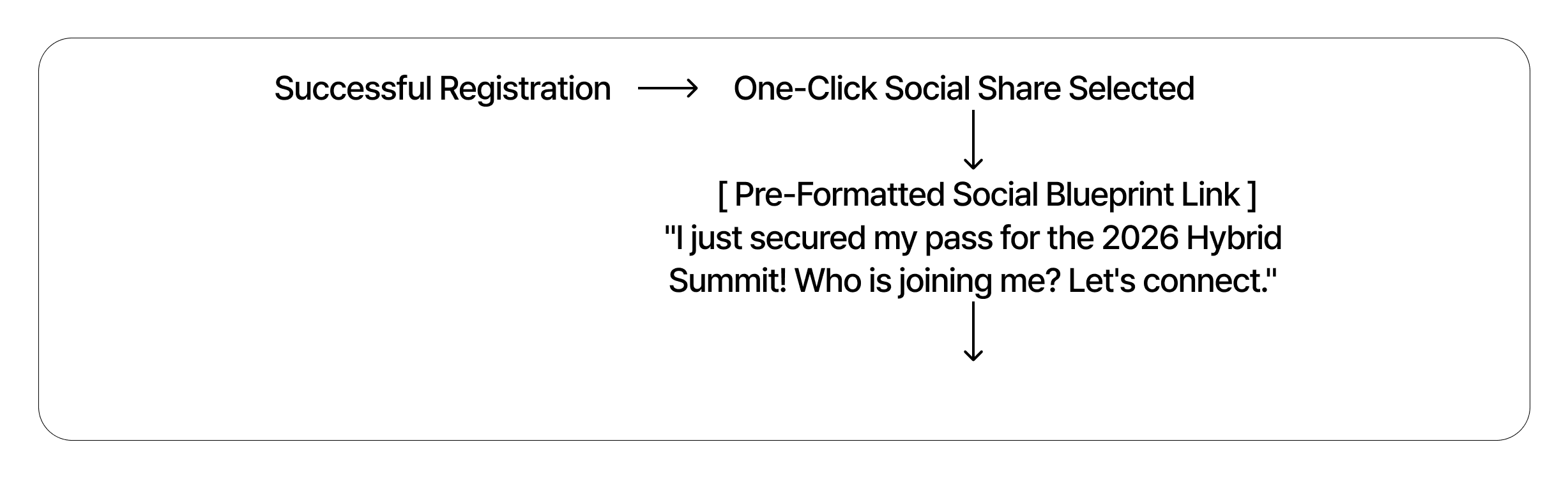
Pre-Formatted Social Blueprints: Embed single-tap sharing buttons for professional networks like LinkedIn and X (formerly Twitter).
Templates for Viral Reach: Instead of forcing the user to draft a post from scratch, pre-populate the sharing field with engaging, ready-to-use text:
"I just secured my spot at the 2026 Enterprise Growth Summit! Looking forward to the keynote sessions. Who else from my network is joining? Let's connect there! 🚀 [Shortened Event Link]"
The Network Effect: When your attendees share this update with their professional circles, it acts as a trusted, authentic recommendation. This visibility drives fresh, highly qualified organic referral traffic back to your registration form completely free of charge.
Now that our post-submission engagement strategies are locked in, let's move to the final piece of the piece. Shall we proceed to Section 6: Conclusion to summarize the conversion framework and place our high-visibility Call-to-Action (CTA) assets?
6. Conclusion: Every Second Reduced is Revenue Gained
In 2026, the success and final scale of an event are no longer determined solely by the grandeur of the venue, the celebrity status of the keynote speakers, or the depth of the presentation topics. Instead, audience acquisition is won or lost in the initial conversion trenches: how effectively you respect and protect your user's time during the registration process.
Trimming down manual tasks, replacing legacy password creation loops with biometric authentication, using background data enrichment platforms, and matching your user paths dynamically using conditional logic all serve a clear business purpose. They turn a tedious administrative task into an intuitive, seamless interaction.
Organizations that can move a prospect from initial interest to a confirmed calendar invite in under 30 seconds are the ones that secure high-density audiences and maximize event ROI. In the modern attention economy, minimizing sign-up friction isn't just a design choice—it is a direct contributor to your bottom line.
Build Your High-Conversion Event Flow Today
Do not let complicated, outdated forms get in the way of your event's growth. Deploy a fast, modern, and automated registration pipeline designed for the expectations of 2026.
1. The 2026 Registration Landscape
The digital ecosystem is defined by a critical shortage of consumer attention. Audience focus has become highly fragmented, and users are more protective of their digital time than ever before.
If your event registration form looks like an administrative tax document—packed with seven or more mandatory, manual text inputs—you are actively driving potential attendees away. Current industry benchmarks indicate that traditional, multi-field registration forms suffer from an average abandonment rate of over 40%. Every unnecessary manual field asking a user to re-type information they have already saved elsewhere serves as a direct exit ramp from your conversion funnel.
The Paradigm Shift: From Roster Management to Frictionless UX
The days of viewing sign-up pages as mere spreadsheet collectors are gone.
The Modern Rule of Event Operations: Event registration is no longer an exercise in roster collection; it is the definitive first step of your attendee's product experience.
Registration must be designed as a frictionless journey. It begins the exact millisecond a prospect interacts with your invitation link and is only truly complete when the confirmed session is saved natively inside their personal calendar application. If your pipeline includes even a single point of friction—such as a forced password creation, a non-responsive layout, or a tedious manual credit card entry—your conversion velocity drops.
Objective of this Guide
To scale an audience for an inline webinar, a B2B summit, or a large-scale hybrid conference, you must modernize your data ingestion strategy.
This guide outlines the essential UX design principles and behavioral mechanics required to safeguard your sign-up conversion rates. We will explore how leading event organizers leverage Walla to build highly responsive, adaptive registration forms that seamlessly combine dynamic hybrid routing (in-person vs. virtual tracks), native single-tap payment infrastructure, and automated post-submission workflows.
2. 2026 Core Best Practices for Form UX
In 2026, maximizing your form's conversion rate requires removing every possible manual obstacle. High-performing forms are no longer passive lists of text fields; they act as smart, responsive interfaces that anticipate user data, secure transactions instantly, and use real-time psychological cues to encourage completion.
(1) Passwordless Authentication & One-Click Single Sign-On (SSO)
Forcing a user to create a new password or go through a clunky 6-digit email verification loop just to register for an event is an outdated digital hurdle. Every step away from the form to check an inbox increases the risk of the user abandoning the process.
Frictionless Authentication: Avoid complex verification loops that force users out of the registration funnel. Instead, utilize one-click Google, Apple, or LinkedIn Single Sign-On (SSO) built straight into the form container to secure authentication instantly.
Unified Identity Providers: Embed one-click Google, Apple, and LinkedIn SSO buttons at the very top of the form layout. Securing authentication instantly eliminates registration friction entirely.
(2) AI-Driven Profile Enriched Lookup
The most effective way to optimize form completion rates is simple: stop asking users to type out information you can find automatically. Requiring applicants to manually fill in their company name, precise job title, seniority level, and industry segment is a primary cause of form abandonment.
[ User Types Corporate Email ] ──> Dynamic API Enrichment Triggered │ ▼ [ Silent Backend Mapping ] • Fetches Job Title via LinkedIn API • Pulls Company Size & Industry • Populates CRM Fields Invisibly
Data Minimization: Keep the visible interface clean by asking only for the user's professional email address.
Invisibly Enriched Payloads: As soon as the domain is keyed in, Walla’s robust Webhook and API architecture can trigger a seamless data pipeline with your data enrichment ecosystem (such as Clay or Zapier) to automatically map company metrics, team size, and professional roles in the background. Your team gathers high-density data, while the user enjoys a form with only two visible fields.
(3) Mobile Wallet Integration & One-Touch Payments
If your event requires a paid ticket, the checkout step is often where your conversion pipeline is most vulnerable. Forcing a mobile user to pull out a physical credit card and manually type in a 16-digit card number, expiration date, and CVV code on a smartphone keyboard can devastate conversion rates.
Native Wallet Architecture: Embed secure, mobile-optimized checkout layers directly into the base form layout.
Frictionless Mobile Checkouts: Integrate secure, mobile-optimized payment layers directly within your registration loop. By offering integrated support for leading digital wallets and local card gateways (Toss Pay, KakaoPay, or global gateways), you eliminate the need for manual card entry, optimizing conversion rates even inside mobile in-app browsers.
(4) Floating Visual Urgency (Dynamic FOMO)
User procrastination is a constant challenge for conversion rates. If a user feels they can register "anytime," they often close the tab and forget to return. You can counter this behavioral pattern by adding real-time, visual scarcity triggers directly into the form wrapper.
Psychological Trigger: Scarcity and urgency drive immediate action. When users see availability dropping in real time, they are significantly more likely to complete their registration immediately.
Sticky Ticker Banners: Position a floating countdown timer or live inventory tracker at the top of the form view.
Real-Time Data Feeds: Display dynamic updates like "⚠️ Only 14 in-person passes remaining" or "Early-Bird pricing expires in 02h : 14m : 05s." Binding these tangible scarcity metrics directly to your actual seating capacity encourages immediate sign-ups, helping you capture demand while user intent is highest.
3. Dynamic Branching: Hybrid Event Routing
In 2026, events are rarely purely physical or entirely digital. Designing a registration form for a hybrid summit introduces a distinct structural challenge: you are managing two completely different audience profiles within a single landing page.
If you use a static, one-size-fits-all questionnaire, your virtual attendees will be forced to skip past irrelevant questions about hotel parking and lunch options. At the same time, your physical attendees might miss critical details about networking session capacities. To maintain a high conversion rate, your form needs to adapt instantly based on the user's selected attendance type.
The Hybrid Attendance Flow Architecture
By using real-time conditional logic, the form splits into two customized data collection pipelines the moment a user selects their attendance path:
Implementing Conditional Field Exposure
Walla’s conditional logic engine handles this routing seamlessly in the background. Instead of sending users to separate landing pages, you can dynamically show or hide fields on the fly. This approach keeps the interface clean and focused for every user.
Path A: The High-Touch In-Person Journey
When a registrant selects In-Person Attendance, the form immediately opens advanced logistics fields. These details are essential for managing physical venue capacities and vendor costs.
Logistics Filtering: The form expands to display a single-choice card question: "Will you be joining our VIP Networking Afterparty?"
Operational Specifics: If they select yes, the system opens a catering dropdown for dietary restrictions (e.g., Vegan, Gluten-Free) and a checkbox for on-site parking validation.
The UX Advantage: These fields only appear for the users who actually need them, ensuring your physical event coordination remains accurate without cluttering the form for digital attendees.
Path B: The Frictionless Virtual Journey
When a registrant clicks Virtual Attendance, the form instantly hides all venue logistics. Digital attendees have a completely different set of priorities, centered around access and schedule clarity.
Eliminating Form Fatigue: All questions about parking, seating, and food vanish. The virtual user skips directly to the final confirmation phase, avoiding unnecessary scrolling.
Smart Timezone Mapping: The backend reads the user’s local browser settings to automatically map their timezone, ensuring follow-up calendar invites display the correct local broadcast times.
Pre-Event Engagement: To add value to the digital experience, the form displays a single text input: "What burning question would you like our keynote speakers to answer live during the streaming session?" This captures high-intent audience data and improves pre-event engagement.
Operational Insight: Protecting your virtual registrants from physical venue questions can reduce digital form abandonment by up to 35%. A clean, targeted question path keeps user motivation high and drives more completions.
Now that the hybrid branching mechanics are mapped out, where should we focus next to round out this event registration guide: should we dive into Section 4: The Event Tech Stack and Automated Pipelines (Google Calendar links, HubSpot syncing, and Slack notifications), or should we build out Section 5: Designing the High-Conversion Post-Submission Thank You Page?
4. The Event Tech Stack: Seamless Automations
An event registration form does not operate in a vacuum. Pressing the "Submit" button shouldn't simply log an entry into an isolated database; it must serve as the primary webhook trigger for your entire marketing and operations ecosystem. In 2026, any delay or gap in data transfer between your registration form and your internal tools can result in lost revenue, inaccurate lead attribution, or higher event drop-out rates.
To ensure reliable data delivery, your registration backend must automatically push clean data payloads to your core software tools the moment a user signs up.
The Real-Time Event Integration Architecture
Target Platform (System) | Data Vector (Payload Mapping) | Operational Value (Business Intent) |
|---|---|---|
HubSpot / Salesforce | Registrant PII, Company Metadata, and UTM Lead Source. | Measures marketing campaign performance and automates Sales Lead (MQL) routing. |
Google Calendar / ICS Link | Event Date, Time, Description, and Access Credentials. | Offers one-click calendar scheduling to minimize event no-shows. |
Slack / Microsoft Teams | Custom Instant Alerts (e.g., "New VIP Ticket Purchased"). | Provides real-time visibility for on-site and virtual operational teams. |
Maximizing the Value of Your Automated Data Flows
(1) CRM Synchronization (HubSpot / Salesforce)
Tracking your acquisition channels accurately is essential for calculating your event's return on investment (ROI).
Attribution Mapping: Walla maps incoming registration data alongside hidden tracking elements, such as UTM parameters and tracking IDs.
Immediate Routing: This automated flow passes directly to your CRM, instantly creating or updating contact records. It tags the specific marketing campaign responsible for the sign-up and routes high-value corporate accounts to the appropriate sales representatives while user intent is highest.
(2) Frictionless Calendar Sync (Google Calendar / ICS)
The biggest threat to virtual webinars and hybrid sessions is the gap between registration and actual attendance. If an attendee has to manually create a calendar entry and copy over the access details, your attendance rates will drop.
Direct Calendar Injection: Your form infrastructure should generate dynamic calendar invitations immediately upon approval.
Reducing No-Shows: Linking these invites directly to the confirmation workflow allows users to save the event date, time, and target stream link (such as Zoom or YouTube Live) directly into their personal calendars with a single tap. This step secures a spot in their daily schedule and helps lower your event no-show rates.
(3) Real-Time Operations Alerts (Slack / Teams)
Managing a large-scale event requires clear, up-to-the-minute visibility into attendee sign-ups and ticket sales.
Instant Operational Visibility: By routing localized webhooks into your team's internal messaging channels (like
#event-2026-conversions), your coordinators can monitor registration activity as it happens.Targeted Team Actions: When high-value VIP tickets or enterprise registrations are completed, your team receives instant notification updates. This visibility helps your staff manage seating arrangements, adjust catering orders, or initiate high-touch executive welcome protocols without needing to manually refresh a database.
Now that the automated data pipeline is configured, let's optimize the final phase of the user experience. Should we proceed to Section 5: Maximizing Post-Submission Velocity to design a high-engagement Thank-You page that drives viral social sharing and calendar bookings?
5. Maximizing Post-Submission Velocity
Many event organizers treat the final "Thank You" page as a passive dead end. Displaying a plain text message like "Thank you for registering; we have sent a confirmation email" is a massive missed opportunity.
Psychologically, the exact millisecond a user clicks the "Submit" button is their point of peak engagement. They have just invested their time, cleared their schedule, and trusted you with their professional data. Instead of letting that momentum fade, a high-converting registration flow uses this high-intent window to drive secondary actions that secure attendance and lower your customer acquisition costs (CAC).
(1) The Centralized One-Click Calendar Invitation
Relying entirely on an email confirmation to get your event onto an attendee's calendar introduces unnecessary friction. Emails get caught in spam filters, lost in busy inboxes, or archived and forgotten.
Prominent Center Placement: Position a clear, high-contrast "Add to Calendar" button right in the center of your post-submission screen.
Unified Device Mapping: This element should use a single dropdown matrix supporting all major calendar networks (Google Calendar, Apple iCal, Microsoft Outlook). By making this option impossible to miss, you ensure the user blocks out the time immediately on their daily schedule—safeguarding your final attendance numbers.
(2) The Social Sharing Hook (Driving Organic Virality)
The most cost-effective marketing channel is word-of-mouth referral. When a professional registers for an industry conference or exclusive webinar, they like to share their network participation with peers. You can transform your new registrants into organic brand advocates by making social proof effortless.
Pre-Formatted Social Blueprints: Embed single-tap sharing buttons for professional networks like LinkedIn and X (formerly Twitter).
Templates for Viral Reach: Instead of forcing the user to draft a post from scratch, pre-populate the sharing field with engaging, ready-to-use text:
"I just secured my spot at the 2026 Enterprise Growth Summit! Looking forward to the keynote sessions. Who else from my network is joining? Let's connect there! 🚀 [Shortened Event Link]"
The Network Effect: When your attendees share this update with their professional circles, it acts as a trusted, authentic recommendation. This visibility drives fresh, highly qualified organic referral traffic back to your registration form completely free of charge.
Now that our post-submission engagement strategies are locked in, let's move to the final piece of the piece. Shall we proceed to Section 6: Conclusion to summarize the conversion framework and place our high-visibility Call-to-Action (CTA) assets?
6. Conclusion: Every Second Reduced is Revenue Gained
In 2026, the success and final scale of an event are no longer determined solely by the grandeur of the venue, the celebrity status of the keynote speakers, or the depth of the presentation topics. Instead, audience acquisition is won or lost in the initial conversion trenches: how effectively you respect and protect your user's time during the registration process.
Trimming down manual tasks, replacing legacy password creation loops with biometric authentication, using background data enrichment platforms, and matching your user paths dynamically using conditional logic all serve a clear business purpose. They turn a tedious administrative task into an intuitive, seamless interaction.
Organizations that can move a prospect from initial interest to a confirmed calendar invite in under 30 seconds are the ones that secure high-density audiences and maximize event ROI. In the modern attention economy, minimizing sign-up friction isn't just a design choice—it is a direct contributor to your bottom line.
Build Your High-Conversion Event Flow Today
Do not let complicated, outdated forms get in the way of your event's growth. Deploy a fast, modern, and automated registration pipeline designed for the expectations of 2026.
1. The 2026 Registration Landscape
The digital ecosystem is defined by a critical shortage of consumer attention. Audience focus has become highly fragmented, and users are more protective of their digital time than ever before.
If your event registration form looks like an administrative tax document—packed with seven or more mandatory, manual text inputs—you are actively driving potential attendees away. Current industry benchmarks indicate that traditional, multi-field registration forms suffer from an average abandonment rate of over 40%. Every unnecessary manual field asking a user to re-type information they have already saved elsewhere serves as a direct exit ramp from your conversion funnel.
The Paradigm Shift: From Roster Management to Frictionless UX
The days of viewing sign-up pages as mere spreadsheet collectors are gone.
The Modern Rule of Event Operations: Event registration is no longer an exercise in roster collection; it is the definitive first step of your attendee's product experience.
Registration must be designed as a frictionless journey. It begins the exact millisecond a prospect interacts with your invitation link and is only truly complete when the confirmed session is saved natively inside their personal calendar application. If your pipeline includes even a single point of friction—such as a forced password creation, a non-responsive layout, or a tedious manual credit card entry—your conversion velocity drops.
Objective of this Guide
To scale an audience for an inline webinar, a B2B summit, or a large-scale hybrid conference, you must modernize your data ingestion strategy.
This guide outlines the essential UX design principles and behavioral mechanics required to safeguard your sign-up conversion rates. We will explore how leading event organizers leverage Walla to build highly responsive, adaptive registration forms that seamlessly combine dynamic hybrid routing (in-person vs. virtual tracks), native single-tap payment infrastructure, and automated post-submission workflows.
2. 2026 Core Best Practices for Form UX
In 2026, maximizing your form's conversion rate requires removing every possible manual obstacle. High-performing forms are no longer passive lists of text fields; they act as smart, responsive interfaces that anticipate user data, secure transactions instantly, and use real-time psychological cues to encourage completion.
(1) Passwordless Authentication & One-Click Single Sign-On (SSO)
Forcing a user to create a new password or go through a clunky 6-digit email verification loop just to register for an event is an outdated digital hurdle. Every step away from the form to check an inbox increases the risk of the user abandoning the process.
Frictionless Authentication: Avoid complex verification loops that force users out of the registration funnel. Instead, utilize one-click Google, Apple, or LinkedIn Single Sign-On (SSO) built straight into the form container to secure authentication instantly.
Unified Identity Providers: Embed one-click Google, Apple, and LinkedIn SSO buttons at the very top of the form layout. Securing authentication instantly eliminates registration friction entirely.
(2) AI-Driven Profile Enriched Lookup
The most effective way to optimize form completion rates is simple: stop asking users to type out information you can find automatically. Requiring applicants to manually fill in their company name, precise job title, seniority level, and industry segment is a primary cause of form abandonment.
[ User Types Corporate Email ] ──> Dynamic API Enrichment Triggered │ ▼ [ Silent Backend Mapping ] • Fetches Job Title via LinkedIn API • Pulls Company Size & Industry • Populates CRM Fields Invisibly
Data Minimization: Keep the visible interface clean by asking only for the user's professional email address.
Invisibly Enriched Payloads: As soon as the domain is keyed in, Walla’s robust Webhook and API architecture can trigger a seamless data pipeline with your data enrichment ecosystem (such as Clay or Zapier) to automatically map company metrics, team size, and professional roles in the background. Your team gathers high-density data, while the user enjoys a form with only two visible fields.
(3) Mobile Wallet Integration & One-Touch Payments
If your event requires a paid ticket, the checkout step is often where your conversion pipeline is most vulnerable. Forcing a mobile user to pull out a physical credit card and manually type in a 16-digit card number, expiration date, and CVV code on a smartphone keyboard can devastate conversion rates.
Native Wallet Architecture: Embed secure, mobile-optimized checkout layers directly into the base form layout.
Frictionless Mobile Checkouts: Integrate secure, mobile-optimized payment layers directly within your registration loop. By offering integrated support for leading digital wallets and local card gateways (Toss Pay, KakaoPay, or global gateways), you eliminate the need for manual card entry, optimizing conversion rates even inside mobile in-app browsers.
(4) Floating Visual Urgency (Dynamic FOMO)
User procrastination is a constant challenge for conversion rates. If a user feels they can register "anytime," they often close the tab and forget to return. You can counter this behavioral pattern by adding real-time, visual scarcity triggers directly into the form wrapper.
Psychological Trigger: Scarcity and urgency drive immediate action. When users see availability dropping in real time, they are significantly more likely to complete their registration immediately.
Sticky Ticker Banners: Position a floating countdown timer or live inventory tracker at the top of the form view.
Real-Time Data Feeds: Display dynamic updates like "⚠️ Only 14 in-person passes remaining" or "Early-Bird pricing expires in 02h : 14m : 05s." Binding these tangible scarcity metrics directly to your actual seating capacity encourages immediate sign-ups, helping you capture demand while user intent is highest.
3. Dynamic Branching: Hybrid Event Routing
In 2026, events are rarely purely physical or entirely digital. Designing a registration form for a hybrid summit introduces a distinct structural challenge: you are managing two completely different audience profiles within a single landing page.
If you use a static, one-size-fits-all questionnaire, your virtual attendees will be forced to skip past irrelevant questions about hotel parking and lunch options. At the same time, your physical attendees might miss critical details about networking session capacities. To maintain a high conversion rate, your form needs to adapt instantly based on the user's selected attendance type.
The Hybrid Attendance Flow Architecture
By using real-time conditional logic, the form splits into two customized data collection pipelines the moment a user selects their attendance path:
Implementing Conditional Field Exposure
Walla’s conditional logic engine handles this routing seamlessly in the background. Instead of sending users to separate landing pages, you can dynamically show or hide fields on the fly. This approach keeps the interface clean and focused for every user.
Path A: The High-Touch In-Person Journey
When a registrant selects In-Person Attendance, the form immediately opens advanced logistics fields. These details are essential for managing physical venue capacities and vendor costs.
Logistics Filtering: The form expands to display a single-choice card question: "Will you be joining our VIP Networking Afterparty?"
Operational Specifics: If they select yes, the system opens a catering dropdown for dietary restrictions (e.g., Vegan, Gluten-Free) and a checkbox for on-site parking validation.
The UX Advantage: These fields only appear for the users who actually need them, ensuring your physical event coordination remains accurate without cluttering the form for digital attendees.
Path B: The Frictionless Virtual Journey
When a registrant clicks Virtual Attendance, the form instantly hides all venue logistics. Digital attendees have a completely different set of priorities, centered around access and schedule clarity.
Eliminating Form Fatigue: All questions about parking, seating, and food vanish. The virtual user skips directly to the final confirmation phase, avoiding unnecessary scrolling.
Smart Timezone Mapping: The backend reads the user’s local browser settings to automatically map their timezone, ensuring follow-up calendar invites display the correct local broadcast times.
Pre-Event Engagement: To add value to the digital experience, the form displays a single text input: "What burning question would you like our keynote speakers to answer live during the streaming session?" This captures high-intent audience data and improves pre-event engagement.
Operational Insight: Protecting your virtual registrants from physical venue questions can reduce digital form abandonment by up to 35%. A clean, targeted question path keeps user motivation high and drives more completions.
Now that the hybrid branching mechanics are mapped out, where should we focus next to round out this event registration guide: should we dive into Section 4: The Event Tech Stack and Automated Pipelines (Google Calendar links, HubSpot syncing, and Slack notifications), or should we build out Section 5: Designing the High-Conversion Post-Submission Thank You Page?
4. The Event Tech Stack: Seamless Automations
An event registration form does not operate in a vacuum. Pressing the "Submit" button shouldn't simply log an entry into an isolated database; it must serve as the primary webhook trigger for your entire marketing and operations ecosystem. In 2026, any delay or gap in data transfer between your registration form and your internal tools can result in lost revenue, inaccurate lead attribution, or higher event drop-out rates.
To ensure reliable data delivery, your registration backend must automatically push clean data payloads to your core software tools the moment a user signs up.
The Real-Time Event Integration Architecture
Target Platform (System) | Data Vector (Payload Mapping) | Operational Value (Business Intent) |
|---|---|---|
HubSpot / Salesforce | Registrant PII, Company Metadata, and UTM Lead Source. | Measures marketing campaign performance and automates Sales Lead (MQL) routing. |
Google Calendar / ICS Link | Event Date, Time, Description, and Access Credentials. | Offers one-click calendar scheduling to minimize event no-shows. |
Slack / Microsoft Teams | Custom Instant Alerts (e.g., "New VIP Ticket Purchased"). | Provides real-time visibility for on-site and virtual operational teams. |
Maximizing the Value of Your Automated Data Flows
(1) CRM Synchronization (HubSpot / Salesforce)
Tracking your acquisition channels accurately is essential for calculating your event's return on investment (ROI).
Attribution Mapping: Walla maps incoming registration data alongside hidden tracking elements, such as UTM parameters and tracking IDs.
Immediate Routing: This automated flow passes directly to your CRM, instantly creating or updating contact records. It tags the specific marketing campaign responsible for the sign-up and routes high-value corporate accounts to the appropriate sales representatives while user intent is highest.
(2) Frictionless Calendar Sync (Google Calendar / ICS)
The biggest threat to virtual webinars and hybrid sessions is the gap between registration and actual attendance. If an attendee has to manually create a calendar entry and copy over the access details, your attendance rates will drop.
Direct Calendar Injection: Your form infrastructure should generate dynamic calendar invitations immediately upon approval.
Reducing No-Shows: Linking these invites directly to the confirmation workflow allows users to save the event date, time, and target stream link (such as Zoom or YouTube Live) directly into their personal calendars with a single tap. This step secures a spot in their daily schedule and helps lower your event no-show rates.
(3) Real-Time Operations Alerts (Slack / Teams)
Managing a large-scale event requires clear, up-to-the-minute visibility into attendee sign-ups and ticket sales.
Instant Operational Visibility: By routing localized webhooks into your team's internal messaging channels (like
#event-2026-conversions), your coordinators can monitor registration activity as it happens.Targeted Team Actions: When high-value VIP tickets or enterprise registrations are completed, your team receives instant notification updates. This visibility helps your staff manage seating arrangements, adjust catering orders, or initiate high-touch executive welcome protocols without needing to manually refresh a database.
Now that the automated data pipeline is configured, let's optimize the final phase of the user experience. Should we proceed to Section 5: Maximizing Post-Submission Velocity to design a high-engagement Thank-You page that drives viral social sharing and calendar bookings?
5. Maximizing Post-Submission Velocity
Many event organizers treat the final "Thank You" page as a passive dead end. Displaying a plain text message like "Thank you for registering; we have sent a confirmation email" is a massive missed opportunity.
Psychologically, the exact millisecond a user clicks the "Submit" button is their point of peak engagement. They have just invested their time, cleared their schedule, and trusted you with their professional data. Instead of letting that momentum fade, a high-converting registration flow uses this high-intent window to drive secondary actions that secure attendance and lower your customer acquisition costs (CAC).
(1) The Centralized One-Click Calendar Invitation
Relying entirely on an email confirmation to get your event onto an attendee's calendar introduces unnecessary friction. Emails get caught in spam filters, lost in busy inboxes, or archived and forgotten.
Prominent Center Placement: Position a clear, high-contrast "Add to Calendar" button right in the center of your post-submission screen.
Unified Device Mapping: This element should use a single dropdown matrix supporting all major calendar networks (Google Calendar, Apple iCal, Microsoft Outlook). By making this option impossible to miss, you ensure the user blocks out the time immediately on their daily schedule—safeguarding your final attendance numbers.
(2) The Social Sharing Hook (Driving Organic Virality)
The most cost-effective marketing channel is word-of-mouth referral. When a professional registers for an industry conference or exclusive webinar, they like to share their network participation with peers. You can transform your new registrants into organic brand advocates by making social proof effortless.
Pre-Formatted Social Blueprints: Embed single-tap sharing buttons for professional networks like LinkedIn and X (formerly Twitter).
Templates for Viral Reach: Instead of forcing the user to draft a post from scratch, pre-populate the sharing field with engaging, ready-to-use text:
"I just secured my spot at the 2026 Enterprise Growth Summit! Looking forward to the keynote sessions. Who else from my network is joining? Let's connect there! 🚀 [Shortened Event Link]"
The Network Effect: When your attendees share this update with their professional circles, it acts as a trusted, authentic recommendation. This visibility drives fresh, highly qualified organic referral traffic back to your registration form completely free of charge.
Now that our post-submission engagement strategies are locked in, let's move to the final piece of the piece. Shall we proceed to Section 6: Conclusion to summarize the conversion framework and place our high-visibility Call-to-Action (CTA) assets?
6. Conclusion: Every Second Reduced is Revenue Gained
In 2026, the success and final scale of an event are no longer determined solely by the grandeur of the venue, the celebrity status of the keynote speakers, or the depth of the presentation topics. Instead, audience acquisition is won or lost in the initial conversion trenches: how effectively you respect and protect your user's time during the registration process.
Trimming down manual tasks, replacing legacy password creation loops with biometric authentication, using background data enrichment platforms, and matching your user paths dynamically using conditional logic all serve a clear business purpose. They turn a tedious administrative task into an intuitive, seamless interaction.
Organizations that can move a prospect from initial interest to a confirmed calendar invite in under 30 seconds are the ones that secure high-density audiences and maximize event ROI. In the modern attention economy, minimizing sign-up friction isn't just a design choice—it is a direct contributor to your bottom line.
Build Your High-Conversion Event Flow Today
Do not let complicated, outdated forms get in the way of your event's growth. Deploy a fast, modern, and automated registration pipeline designed for the expectations of 2026.