Traditional survey platforms are structurally designed as standalone tools for data collection and static report generation. When integrating these platforms with external enterprise systems—such as CRMs, databases, and collaboration tools—organizations frequently encounter technical bottlenecks.
This guide outlines the architectural constraints of legacy survey software, the data processing mechanisms of Walla's front-end engine, and step-by-step blueprints for deploying secure, automated data pipelines.
1. Architectural Constraints of Traditional Survey Tools
When building automated workflows using legacy form tools, engineering and operations teams face two primary systemic limitations.
(1) Tier-Gated API and Webhook Access
Many legacy survey platforms restrict outbound webhook transmissions and third-party automation triggers (such as Zapier integration) to their highest enterprise tiers. Gating basic data-routing capabilities behind opaque or high-cost pricing plans artificially inflates the fixed overhead required to maintain a connected software stack.
(5) Pipeline Pollution via Unfiltered Data Payloads
Legacy form tools lack advanced, server-side filtration rules. When a user completes a form, the platform transmits the entire raw JSON payload indiscriminately.
Inefficient Resource Consumption: Incomplete entries, spam submissions, and out-of-scope responses are pushed downstream. This wastes Zapier task quotas and increases API consumption costs.
Database Contamination: Without strict validation and filtering at the source, unrefined data pollutes destination environments (e.g., HubSpot, Salesforce), necessitating secondary, manual data-cleansing operations.
2. Walla’s Webhook and Data Processing Architecture
Walla processes data at the browser and ingestion layers to ensure downstream pipelines receive structured, secure, and valid information.
Client-Side Validation and Payload Optimization
Walla handles conditional question logic and field validation directly on the client side (browser layer) as the user interacts with the form. Responses that fail validation or fall outside defined parameters can be blocked from triggering outbound webhooks entirely. This client-side pre-processing ensures consistent payload structures and reduces runtime execution errors in downstream applications.
Server-Side Data Masking Before Transmission
Before a data payload is dispatched to third-party automation networks or external cloud storage, Walla applies server-side redaction based on administrator-defined rules. Specific fields containing sensitive Personally Identifiable Information (PII) or financial values are masked (***-****) at the ingestion layer. This shields sensitive data in transit and aligns the pipeline with corporate data governance and compliance guidelines.
3. Automation Blueprints by Business Function (Zapier Integration)
Category A: Sales & Lead Generation
Recipe 1. [Walla + Salesforce] Automated High-Value Lead Routing
When an incoming submission satisfies predefined lead-scoring thresholds, Zapier generates a corresponding 'Lead' object within Salesforce and programmatically assigns ownership to the designated account executive.
Recipe 2. [Walla + HubSpot] Response-Based Contact Segmentation
Depending on the pain points or company parameters selected within the Walla interface, Zapier updates specific custom properties or tags inside HubSpot, automatically triggering a tailored email nurture sequence.
Category B: Real-Time Communication & Triage
Recipe 3. [Walla + Slack] CSAT/NPS Detractor Notifications
If a respondent submits a Net Promoter Score (NPS) or Customer Satisfaction (CSAT) rating of 5 or lower, Zapier routes the summary and customer contact details directly to a designated
#cs-triageSlack channel for immediate remediation.
Recipe 4. [Walla + MS Teams] Structured Bug Report Routing
Technical anomalies reported through user feedback loops are formatted into markdown blocks and posted directly to a Microsoft Teams QA channel, establishing an un-siloed path for engineering review.
Category C: Backend Workspaces & Operations
Recipe 5. [Walla + Airtable] Relational Database Synchronization
Pristine data captured via Walla is systematically appended as structured rows inside Airtable, keeping centralized internal operations dashboards aligned in real time without manual CSV manipulation.
Recipe 6. [Walla + Notion] Client Onboarding Workspace Provisioning
Upon submission of a B2B project scope or requirements questionnaire, Zapier commands Notion to clone a pre-configured project template, establishing a distinct client workspace populated with initial action items.
Recipe 7. [Walla + Google Sheets] Low-Latency Log Streaming
Every raw submission is mirrored directly into a master Google Sheet alongside server-side timestamps, providing data analysts with an accessible raw data stream for ad-hoc auditing and pivot reporting.
Category D: Customer Support & Success
Recipe 8. [Walla + Zendesk / Intercom] Ticket Generation via Intent Mapping
When a submission explicitly flags technical blockers or account access issues, Zapier converts the form payload directly into a prioritized support ticket within Zendesk or Intercom, pre-populated with diagnostic context.
Category E: Marketing & Audience Segmentation
Recipe 9. [Walla + Mailchimp / ActiveCampaign] Subscriber List Micro-Tagging
User demographic profiles and product preferences captured by Walla are pushed to marketing automation systems to dynamically segment subscriber pools, optimizing targeted email campaigns.
Category F: Data Governance & Security
Recipe 10. [Walla + Google Drive] Compliant Report Archiving
Walla generates an exportable summary PDF with PII masked at the root. Zapier fetches this redacted document and archives it directly within a secure, permission-restricted folder inside Google Drive.
4. Automation Summary Matrix
Recipe & Core Integration Stack | Complexity | Intended User Base | Primary Operational Outcome |
|---|---|---|---|
1. [Walla + Salesforce] | High | Enterprise Sales, RevOps Teams | Selectively qualifies and assigns incoming pipelines directly within the CRM without manual intervention. |
2. [Walla + HubSpot] | Medium | Growth Marketing, Lead Nurture | Alters contact properties based on user answers to instantly engage prospects with personalized content loops. |
3. [Walla + Slack] | Low | Customer Success, Support Ops | Surfaces critical, low-sentiment scores in team channels to support active churn prevention workflows. |
4. [Walla + MS Teams] | Low | Product Managers, QA Squads | Formats customer-facing defect descriptions and delivers them straight to technical triage environments. |
5. [Walla + Airtable] | Medium | Operations Leads, Early Startups | Maintains real-time data alignment across operational dashboards, replacing periodic file exports. |
6. [Walla + Notion] | Medium | B2B Agencies, Account Managers | Automates client workspace setup, instantly creating standalone tracking wikis upon intake completion. |
7. [Walla + Google Sheets] | Low | Data Analysts, BI Specialists | Builds automated, chronologically ordered raw data stores to preserve data lineage for downstream audits. |
8. [Walla + Zendesk] | Medium | Helpdesk Managers, Customer Care | Identifies explicit troubleshooting intents and translates them into actionable helpdesk records. |
9. [Walla + Mailchimp] | Low | Lifecycle Marketers, Content Ops | Categorizes mailing list recipients based on declared user profiles to improve email engagement. |
10. [Walla + Google Drive] | High | Compliance Officers, Security Teams | Generates and secures redacted interaction logs within restricted cloud infrastructure to meet governance standards. |
5. Optimizing Corporate Messenger (Slack/Teams) Real-Time Alerts
Standard email alerts are easily lost in high-volume corporate inboxes, and locking feedback inside standalone survey dashboards isolates insights from key stakeholders (such as developers and designers). When routing Walla webhooks into corporate messaging environments, use the following engineering principles to maintain utility and prevent alert fatigue.
Standardizing Layouts for Rapid Extraction
Walla’s JSON outputs are structured to map cleanly into layout frameworks like Slack Block Kit or Microsoft Teams Adaptive Cards. By leveraging markdown formatting and explicit status markers (⚠️ Critical, ✅ Standard) at the integration junction, you ensure payloads compile into scannable notification blocks. This allows on-duty personnel to evaluate user feedback within the messenger interface without moving to an external window.
Isolating Data Streams by Intent and Sentiment
Streaming every form submission into a single open channel creates notification noise, which often drives employees to mute the channel. To prevent this:
Promoter Feedback (CSAT 9–10): Route positive sentiments and testimonials to public channels (
#general-celeb) to maintain visibility on customer satisfaction across the company.Detractor / Flaw Submissions (CSAT ≤5 or specific error keywords): Divert critical entries to restricted triage channels (
#cs-triage) to ensure immediate action by customer success or QA teams without cluttering public feeds.
6. Secure Architecture for Anonymous Employee Engagement & DEI Surveys
Workforce evaluation frameworks and Diversity, Equity, and Inclusion (DEI) initiatives require absolute privacy. If employees suspect that network metadata, submission timestamps, or demographic groupings can be cross-referenced to unmask their identity, they will provide guarded or unrepresentative responses. Walla mitigates this issue by enforcing pseudo-anonymity blocks at the protocol level.
Zero-Knowledge Metadata Discarding
When a survey is explicitly designated as "Anonymous," Walla separates the response payload from the sender's digital footprint at the network perimeter.
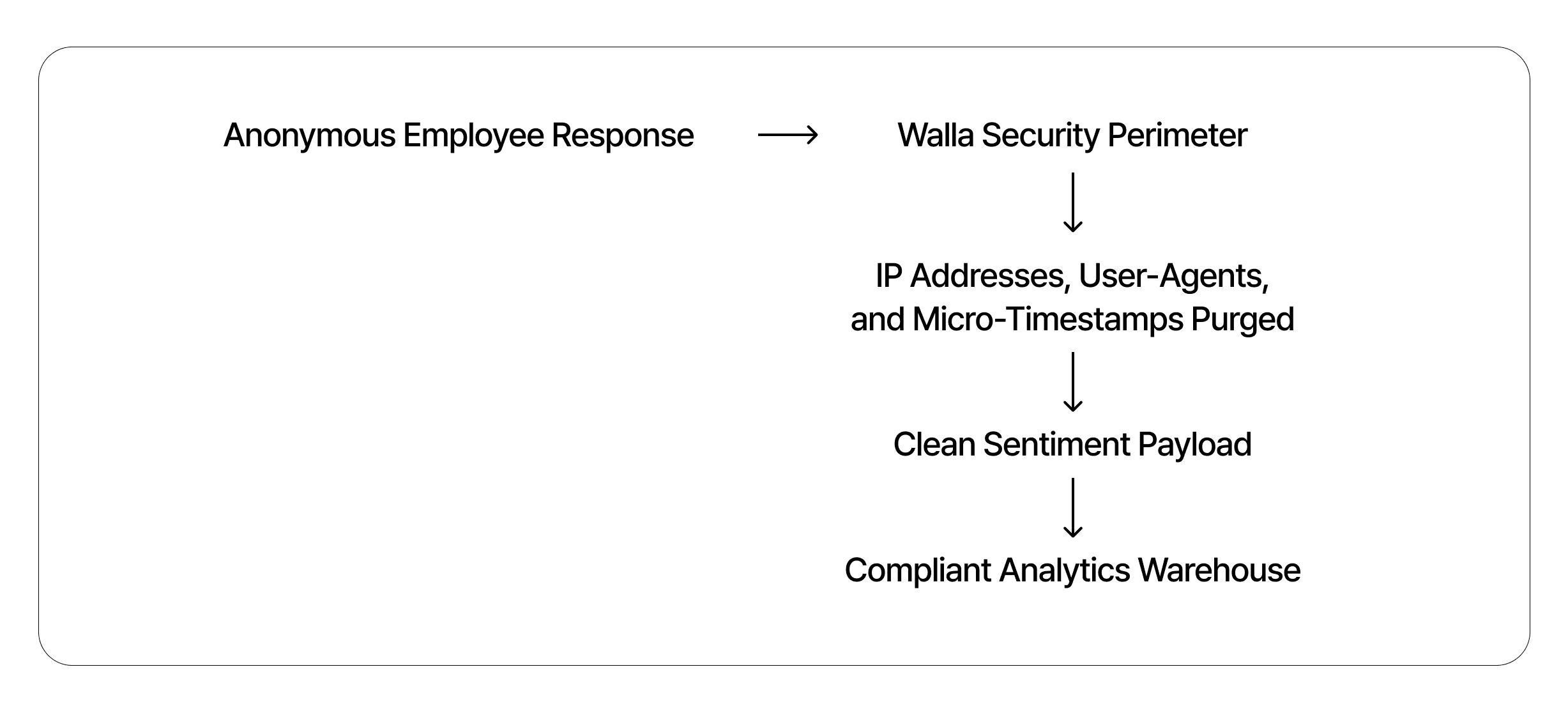
The system discards incoming IP addresses, browser fingerprint string variables (User-Agents), and precise micro-timestamps at the ingestion gateway. Because this tracking information is deleted immediately, it is impossible to reconstruct identities by correlating system logs against corporate activity feeds.
Enforced Role-Based Access Control and Cohort Aggregation
Role-Based Access Control (RBAC): Walla allows organizations to restrict database visualization options. You can block administrative personnel from browsing single, linear rows of raw data, restricting access exclusively to aggregated trend lines, distribution indices, and summary bar graphs.
Threshold-Based Metric Alerts: The pipeline can be configured to block real-time notifications for individual entries. Instead, notifications are delivered based on aggregate shifts, such as: "The engagement average for the Engineering cohort has shifted downward by 20% over a rolling 14-day window." This keeps individual data points anonymous while delivering actionable team insights to leadership.
7. Recommendations for Fault-Tolerant Deployments
Data assets yield the highest return when they flow safely and automatically across the applications your teams use every day. Replacing static manual collection methods with an event-driven survey pipeline improves operational agility while reducing data handling costs.